アトムニャン開発日誌
PicoRubyのWeb terminalやRuntimeGemsがうまく動くようになったらPicoRubyアトムニャンのレシピにブログに書いて人にすすめて歩こうと思ってるのにちょっとまだかかりそうで、かといって初めての人にいきなりビルドから入ってもらうのなんとなくためらう。しかし公開の圧も感じるのでここに書いてくことにする。普段ESP32でPicoRuby動かしてるひとになら通じるだろう。
用意するもの
- ボディ
- 本体
インストール
Setting Up a Development Environment の手順通り入れていくが以下の点に注意が必要
- AtomS3をダウンロードモード(ボタン長押し+USB接続)
- 最初に Raspberry Pi Pico 繋ぐときみたいな感じでつなぐ
- 通常のESP32(Atom Matrixなど)はesptoolが自動でダウンロードモードに切り替えてくるけど、AtomS3のようにUSBが内蔵のボードだと自分で手動で入れる必要があるトノコト
When using USB console (boards without an external USB-to-UART chip)の手順が必要- 中身はesp32s3なのでsetupは以下を選ぶ
$ rake setup_esp32s3 # if you use esp32s3
コード
何にも作らず標準で入っているSPI使っただけでもメモリキチキチに調整すればまばたき表示くらいはできる。
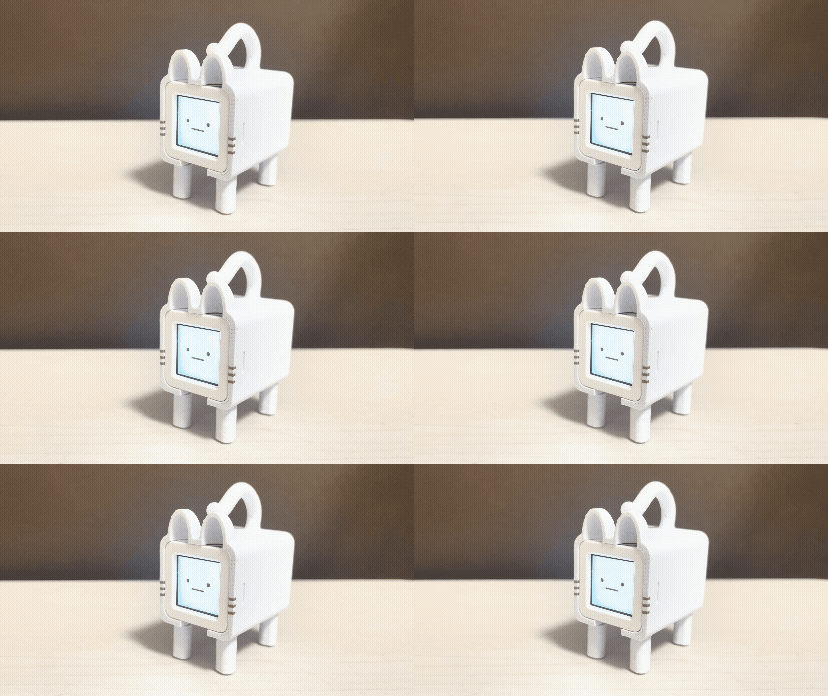
require "spi"

dc  = GPIO.new(33, GPIO::OUT)
rst = GPIO.new(34, GPIO::OUT)

bl = GPIO.new(16, GPIO::OUT)
bl.write(1)

rst.write(1); sleep_ms 10
rst.write(0); sleep_ms 10
rst.write(1); sleep_ms 120

spi = SPI.new(
  unit: :ESP32_SPI2_HOST,
  frequency: 40_000_000,
  sck_pin: 17,
  copi_pin: 21,
  cipo_pin: -1,
  cs_pin: 15,
  mode: 0
)

dc.write(0); spi.write(0xFE)
dc.write(0); spi.write(0xEF)
dc.write(0); spi.write(0x3A)
dc.write(1); spi.write(0x05)
dc.write(0); spi.write(0x36)
dc.write(1); spi.write(0xC8)
dc.write(0); spi.write(0x11)
sleep_ms 120
dc.write(0); spi.write(0x21)
dc.write(0); spi.write(0x29)

# Fill screen white
dc.write(0); spi.write(0x2A)
dc.write(1); spi.write(0x00, 0x02, 0x00, 0x81)
dc.write(0); spi.write(0x2B)
dc.write(1); spi.write(0x00, 0x01, 0x00, 0x80)
dc.write(0); spi.write(0x2C)
dc.write(1)
buf = "\xFF\xFF" * 128
i = 0
while i < 128
  spi.write(buf)
  i += 1
end

# Mouth
dc.write(0); spi.write(0x2A)
dc.write(1); spi.write(0x00, 0x2E, 0x00, 0x56)
dc.write(0); spi.write(0x2B)
dc.write(1); spi.write(0x00, 0x4C, 0x00, 0x4F)
dc.write(0); spi.write(0x2C)
dc.write(1)
buf = "\x00\x00" * 41
i = 0
while i < 4
  spi.write(buf)
  i += 1
end

# Blink loop
op = 1
c = 0
while true
  col = 0x1D
  while col <= 0x5D
    dc.write(0); spi.write(0x2A)
    dc.write(1); spi.write(0x00, col, 0x00, col + 10)
    dc.write(0); spi.write(0x2B)
    dc.write(1); spi.write(0x00, 0x36, 0x00, 0x40)
    dc.write(0); spi.write(0x2C)
    dc.write(1)
    dy = -5
    while dy <= 5
      dx = -5
      while dx <= 5
        b = 0
        if op == 1
          b = 1 if dx * dx + dy * dy <= 25
        else
          b = 1 if dy == 0
        end
        if b == 1
          spi.write("\x00\x00")
        else
          spi.write("\xFF\xFF")
        end
        dx += 1
      end
      dy += 1
    end
    col += 0x40
  end
  if op == 1
    c += 1
    sleep_ms(5000 + c * 7 % 5 * 1000)
    op = 0
  else
    sleep_ms 150
    op = 1
  end
end
でもそれだと厳しいのでmrbgemを作ったがちょっと微妙なので作り直している。(picoruby-lcdと、スタックチャンにも応用できるようなでかいネームスペースの汎用型のものを考えてみたがやってみてはじめていまいちがわかった)
picoruby-lcd部分(まずはRuby実装だけで)
require "gpio"
require "spi"

class LCD
  attr_reader :width, :height

  def initialize(controller, spi:, dc:, rst:, bl:)
    @spi = spi
    @dc = GPIO.new(dc, GPIO::OUT)
    @rst = GPIO.new(rst, GPIO::OUT)
    @bl = GPIO.new(bl, GPIO::OUT)

    # Reset
    @rst.write(1); sleep_ms 10
    @rst.write(0); sleep_ms 10
    @rst.write(1); sleep_ms 120

    case controller
    when :gc9107
      init_gc9107
    else
      raise ArgumentError, "Unknown LCD controller: #{controller}"
    end

    @bl.write(1)
  end

  def cmd(byte)
    @dc.write(0)
    @spi.write(byte)
  end

  def data(*bytes)
    @dc.write(1)
    @spi.write(*bytes)
  end

  def fill(color)
    fill_rect(0, 0, @width, @height, color)
  end

  def fill_rect(x, y, w, h, color)
    set_window(x, y, w, h)
    pixel = ((color >> 8) & 0xFF).chr + (color & 0xFF).chr
    buf = pixel * w
    @dc.write(1)
    i = 0
    while i < h
      @spi.write(buf)
      i += 1
    end
  end

  def blit(x, y, w, h, bitmap, fg, bg)
    set_window(x, y, w, h)
    fg_hi = (fg >> 8) & 0xFF
    fg_lo = fg & 0xFF
    bg_hi = (bg >> 8) & 0xFF
    bg_lo = bg & 0xFF
    @dc.write(1)
    i = 0
    total = w * h
    while i < total
      if (bitmap.getbyte(i >> 3) >> (7 - (i & 7))) & 1 == 1
        @spi.write(fg_hi, fg_lo)
      else
        @spi.write(bg_hi, bg_lo)
      end
      i += 1
    end
  end

  def set_window(x, y, w, h)
    x1 = x + @offset_x
    x2 = x1 + w - 1
    y1 = y + @offset_y
    y2 = y1 + h - 1
    cmd(0x2A)
    data((x1 >> 8) & 0xFF, x1 & 0xFF, (x2 >> 8) & 0xFF, x2 & 0xFF)
    cmd(0x2B)
    data((y1 >> 8) & 0xFF, y1 & 0xFF, (y2 >> 8) & 0xFF, y2 & 0xFF)
    cmd(0x2C)
  end

  def init_gc9107
    @width = 128
    @height = 128
    @offset_x = 2
    @offset_y = 1

    cmd(0xFE)               # Inter Register Enable 1
    cmd(0xEF)               # Inter Register Enable 2
    cmd(0x3A); data(0x05)   # Pixel format: RGB565
    cmd(0x36); data(0xC8)   # Memory access control
    cmd(0x11)               # Sleep out
    sleep_ms 120
    cmd(0x21)               # Display inversion on
    cmd(0x29)               # Display on
  end
end
mpu6886のmrbgemも使って傾けたら笑う、振ったらぐるぐるした目みたいなのが一応mrbにコンパイルしなくてもギリいける。
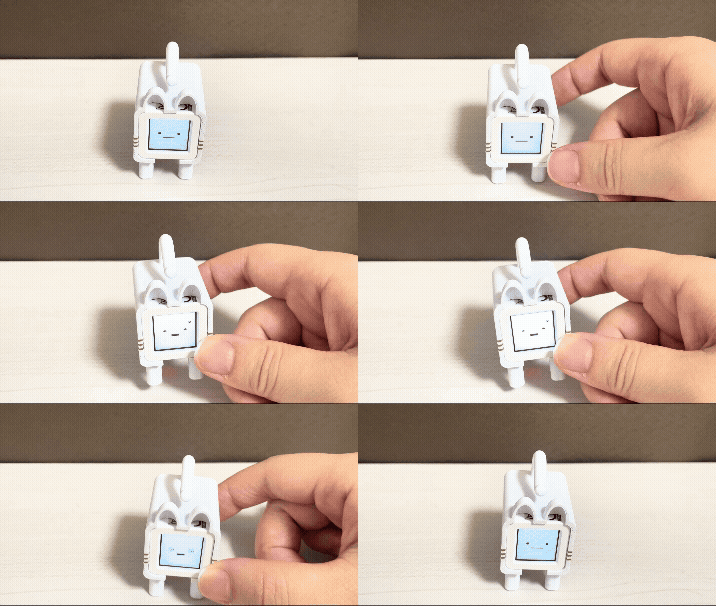
require "spi"
require "lcd"
require "i2c"
require "mpu6886"

spi = SPI.new(unit: :ESP32_SPI2_HOST, frequency: 40_000_000,
              sck_pin: 17, copi_pin: 21, cipo_pin: -1, cs_pin: 15)
lcd = LCD.new(:gc9107, spi: spi, dc: 33, rst: 34, bl: 16)
lcd.fill(0xFFFF)
i2c = I2C.new(unit: :ESP32_I2C0, frequency: 100_000,
              sda_pin: 38, scl_pin: 39)
mpu = MPU6886.new(i2c)

EO = "\x04\x07\xF1\xFF\x3F\xE7\xFD\xFF\xDF\xF3\xFE\x7F\xC7\xF0\x10\x00"
EC = "\x00\x00\x00\x00\x00\x00\x01\xFF\xC0\x00\x00\x00\x00\x00\x00\x00"
EE = "\x00\x00\x00\x38\x1F\xC7\xFC\xFF\xBF\xFF\xFF\x00\x00\x00\x00\x00"
ES = "\x00\x00\x00\x00\x00\x00\x00\x00\x01\xE0\x00\x7F\xE0\x07\xCF\x80\x78\x0E\x03\x00\x38\x38\x00\xC1\x87\x87\x0C\x3E\x18\x60\x38\xC3\x01\xC6\x1C\x0E\x30\x70\x61\x83\xEF\x0C\x0F\xF0\x00\x1E\x00\x00\x00\x00\x00\x00\x00\x00\x00\x00"
EH = "\x63\x7B\xFF\xFF\xF7\xF1\xF8\x70\x10"

lcd.fill(0xFFFF)
lcd.blit(27, 53, 11, 11, EO, 0x0000, 0xFFFF)
lcd.blit(91, 53, 11, 11, EO, 0x0000, 0xFFFF)
lcd.fill_rect(44, 75, 41, 4, 0x0000)
sp = 0
c = 0
t = 50
while true
  a = mpu.acceleration
  if sp == 0
    c += 1
    if c == t
      t = c + 50 + c * 7 % 5 * 10
      lcd.blit(27, 53, 11, 11, EC, 0x0000, 0xFFFF)
      lcd.blit(91, 53, 11, 11, EC, 0x0000, 0xFFFF)
      sleep_ms 150
      lcd.blit(27, 53, 11, 11, EO, 0x0000, 0xFFFF)
      lcd.blit(91, 53, 11, 11, EO, 0x0000, 0xFFFF)
    end
    ts = a[:x] * a[:x] + a[:y] * a[:y] + a[:z] * a[:z]
    if ts > 2.5
      sp = 40
      lcd.blit(22, 48, 21, 21, ES, 0x0000, 0xFFFF)
      lcd.blit(86, 48, 21, 21, ES, 0x0000, 0xFFFF)
      lcd.fill_rect(44, 73, 41, 8, 0xFFFF)
      lcd.fill_rect(52, 73, 25, 8, 0x0000)
    elsif ts < 1.5 && a[:z] > 0.7
      sp = -20
      lcd.blit(27, 53, 11, 11, EE, 0x0000, 0xFFFF)
      lcd.blit(91, 53, 11, 11, EE, 0x0000, 0xFFFF)
      lcd.fill_rect(44, 73, 41, 8, 0xFFFF)
      lcd.fill_rect(52, 73, 25, 8, 0x0000)
      lcd.blit(106, 30, 9, 8, EH, 0x0000, 0xFFFF)
    end
  else
    if sp > 0
      sp -= 1
    else
      sp += 1
    end
    if sp == 0
      lcd.fill(0xFFFF)
      lcd.blit(27, 53, 11, 11, EO, 0x0000, 0xFFFF)
      lcd.blit(91, 53, 11, 11, EO, 0x0000, 0xFFFF)
      lcd.fill_rect(44, 75, 41, 4, 0x0000)
    end
  end
  sleep_ms 100
end
最初からこうではないけどちょっとずつ試しながらあれやこれやとやってるとコードが長くなっていき、節約のため短くしようとしたらこうなった。 一度作ってみるとああしたい、こうしたいが出てくるのでまた磨いていく。動けば一緒と言ってしまえばそうなんだけど、気に入るまで手を入れられるのが個人開発のいいところ。
とはいえ動くのは嬉しいからいろんなところ連れ回してる。